 |
Text Encrypter 256 v 1.0.2.5 |
| by ezio2000 | |
Text Encrypter 256 is a easy to use freeware program (no popups, no ads) that allows you to quickly and easily protect your reserved data by a strong SHA256 encryption, so that you can safety save your passwords, ideas, thoughts etc. and share them with everyone you have provided the related decrypt passwords. With this app kids and teenagers can enjoy sharing secret data between them even if their parents have access to their messaging apps.
Text Encrypter 256 doesn't need installation: simply download the .zip file, unzip it everywhere you want (also a Pen Drive) and run it from there.
The encrypt/decrypt code must be from 4 to 24 chars long (letters, digits, spaces and special chars). Don't lose the code related to a specific encryption or you won't be able anymore to decrypt it.
If the code is short and easy to discover, becomes easy to decrypt your data, especially if are not inserted special characters. A good code is at least 8 chars long, with at least one uppercase letter, one lowercase letter, one number and one space or special char.
Before to encrypt/decrypt your text, your code is anyhow enhanced by the program, in order to make brute-force decryption extremely unlikely. It follows from this that to decrypt a code generated from TE256, users must necessarily use TE256.
Avoid codes easy to remember that others can consider. I.e. your standard birth date "10/09/2004" is easy to consider from your acquaintances, whyle "#10!09!2004" is hard to imagine for anyone.
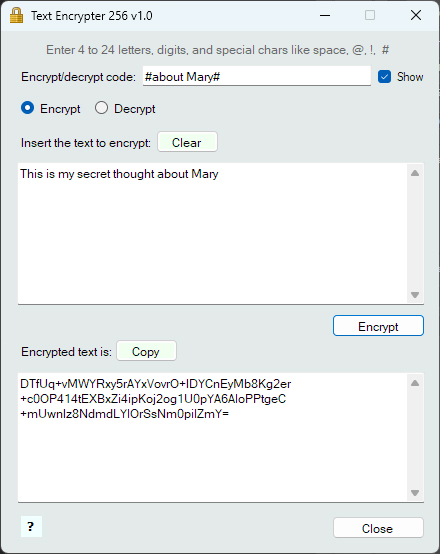
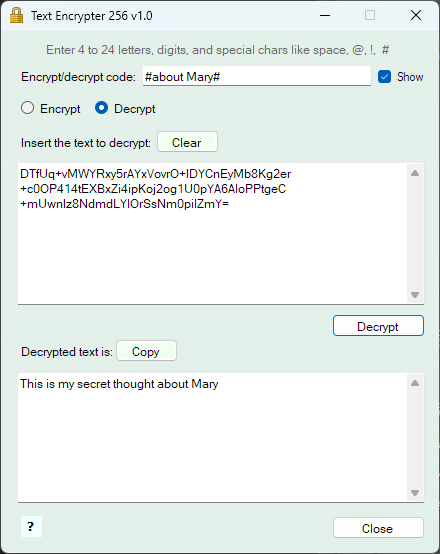
Note: in the below case the encrypt code has two special chars and one space between the words.
 |
 |
| SHA-256 hash of TextEncrypter.exe v1.0.1.4 is: 7881b59f348d7838203798be9c36c89e46a35bc4f9d79186c169569dbab7db3c SHA-256 hash of TextEncrypter.exe v1.0.2.5 is: f9a11c3adc2a82b5266d46c69c8957b4e97f67d8a7091a5fff7efb9e0b27c26e |
|
Security Since the program can manage reserved data, for maximum security it never connects to internet. This means that you have to check manually if is available a new update by the download page of the program itself. For the same reason TE256 never saves any data on the PC: is your job to possibly copy and save encrypted data. Any user with a bit of experience can verify the above statements with a checking program, like ProcessMonitor (ProcMon64). Always scan a new downloaded program with your antivirus. Check the HASH of your file (i.e. by md5file.com/calculator) to be sure it's the original one. |
|
The current version of the program can be also read clicking the " ? " menu, at the top-right of the program window.
Program is not intended for professional use.
Text Encrypter 256 is a freeware software and is expressly provided "AS IS", without any guarantees. Pls take note of the full program disclaimer .
If you find this program useful for you please consider a little donation to support it.
Visit the Author web site