By the 'masq' text boxes you can filter the listed files. Filter can be:
- Positive : use wildcards to "shrink" the files you want to copy according with your mask
- Negative : starting the text masq with '!:' (exclamation mark + colon). Wildcars are not allowed, only simple text after first two chars
Positive filters
May be you don't want to copy all the files of a folder, but only files with certain names or certain extensions. At this purpose you can use the "copy mask" text boxes and the wildchars:
| * | Zero or more characters |
| ? | Exactly one character |
Some examples od mask:
| * | the most generic mask char: copies all available files (both those without any extension) |
| *.* | copies all files that have an extension (any name and any extension) |
*.j* |
copies files with any name and extension that begins with 'j' (jpg, jpeg) |
d*.* |
copies all files that begin with 'd', any extension |
*.avi |
copies only files with the exact 'avi' extension |
???.* |
copies only files with name three chars long, any extension |
??mov.mkv |
copies only files with file name like '21mov.mkv', 'Xymov.mkv' |
This allows you to transfer files from a single starting folder to more specific backup folders (images in one, movies in another etc).
Negative filters
Simple example:
- mask = "*.txt" ... you firstly list and then copy only text files.
- mask = "!: .txt" ... you firstly list and then copy only files that ARE NOT text ones (no wildcard!).
The main purpose of this feature is to avoid to recover also the possible unwanted previous backup copies of a file present in the backup folder, in case of recovery of a loss starting folder.
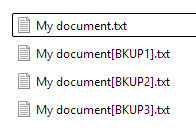
Filtering files by mask= '!: [BKU' for each file of the folder you will recover only the last saved copy of the file, avoiding backup copies. No overwriting problems, since saved files can't be newer of starting files.