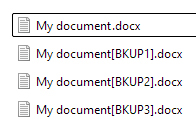
This option consents to preserve up to 6 old versions of your own files so to eventually recover some modified data even if you have not changed the file names. Setting "0" you will copy and overwrite only the last version of the origin file.
If you use this feature is preferable to make specific folders to store your files frequently changed. Anyway you can easily copy and save them in specific destination folders by the use of wildcards.
In the pic below user has checked the row 1 checkbox to make a new backup of his Word files (note that he has probably clicked the AB image to automatically insert/create a "Word" destination folder in the backup destination one), saving up to 4 last versions of each modified file.

Setting 4 old version for .docx documents, for example, in the "D:\My Documents\Word" folder you will save 4 previous version of any Word file.