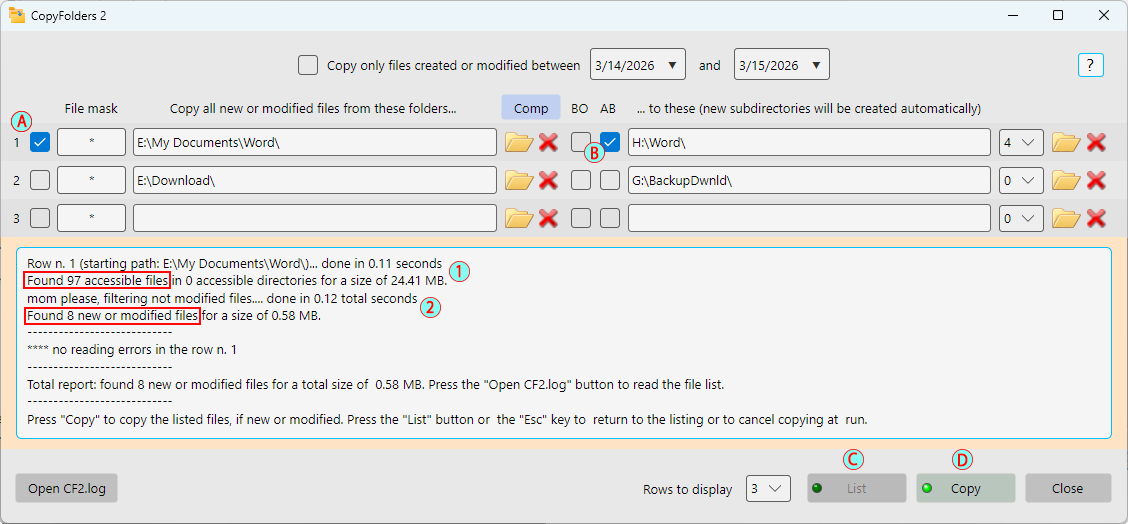
The operation of the program is extremely simple (see the below image):
- After to have checked the checkbox (A), to copy the related row files (only checked rows are considered), user has pressed the "List" button (C) (which therefore activates the "Copy" button). Note that in the below picture probably has been checked the image (B) to automatically insert the basename starting folder (Word) in the destination path
- Once read the report in the text box (press the "Open CF2.log" button to check the files list) then pressing the "Copy" button (D) starts the real copy of selected files, if new or modified, according with dates and masks
Note that the program lists files two times: firstly (1) checks all files in the basename folder and then (2) filters only new or modified ones - All sequences can be stopped at any time, both listing or copying, pressing the keyboard "Esc" button, the "List" button when the green led light is off (as in the picture) or one of the selected rows checkboxes. Doing that you will return to the "List" button active, ready for a new listing